digital painting - photo manipulation - stack filtering - image processing - slit scan - studio artist

Sunday, August 15, 2010

Mutation 6


This image uses another temporal motion rank filter, but it's choosing the pixel with the minimum motion for each spatial location in the stack of portraits. So it's related to yesterday's post, but kind of the inverse effect. It accents similarity as opposed to difference in adjacent images in the portrait stack.

Saturday, August 14, 2010

Mutation 5


This image was generated by using the temporal motion rank filter with the spatially normalized stack or portrait virus paintings. So it analyzes the stack of images and displays the pixel with the maximum motion at each spatial location in the output canvas. Obviously the ordering of the images in the stack is going to influence the result of this kind of processing. So by shuffling the ordering of the images in the stack sequence you could generate different variations of the effect.

Friday, August 13, 2010

Mutation 4


This image is an example that was built from a spatially normalized stack of portrait virus images. By spatial normalization i mean that every painted portrait was spatially warped to a standard portrait facial position. The standard position was just one portrait that i randomly picked out of the 2010 Siggraph portrait virus set. Every other portrait was spatially warped to match the standard position. I'll discuss the mechanics of that process at a later time. The resulting image was generated with the temporal rank filter and can be thought of as the average of all of the portrait virus images. So you could think of it as the generic portrait derived from the entire set.

I've generated another image below that uses the same process, but with the original non-spatially normalized portraits as the input stack. Note that it's much more of a blur and doesn't capture as much of the facial distinctions and detailing of the overall set of portraits.


It does tell us something about the overall set of original portraits (from the standpoint of visualization analysis), mainly that in average the faces do tend to be centered. And for some temporal processing effects that spatial variation of the individual portraits can lead to visually interesting results. But for other processing effects working with the spatially normalized image set can lead to very different results.

Thursday, August 12, 2010

Mutation 3


Thought i'd try an experiment with eye detection. The stack of portraits are processed with a PASeq that auto-selects the painted eyes and then paints those into the canvas. So the eyes build up over time.

So this one is a little different than the stack filter effects that use temporal image processing. Building a PASeq that processes a stack of images to build up a single canvas can be thought of as a different approach to stack filtering. We'll get back to time-based processing tomorrow, but it's important to realize that there's many different approaches you can take to build stack filtering effects.

Again, i'm using the original series of 2010 Siggraph portrait virus images for this example. We will be discussing building a source image series spatially warped to a standard image. If we had used that sequence for this particular effect all of the eyes would be in the same position, so it would not be as effective. However, for other kinds of time based processing the standardized sequence can be very useful. We will show an example of that tomorrow.

Wednesday, August 11, 2010

Mutation 2


Generated with temporal rank neighborhood filtering in Studio Artist 4.

Again, we're working with the original stack of portrait virus images as the input for this effect.

Tuesday, August 10, 2010

Mutation 1


Generated by processing a stack of portrait virus images with a StudioArtist temporal image processing effect.

This first series is based on the original portrait virus images generated at Siggraph 2010. Later we'll be getting into modified image stacks based on spatially warping the stack of images to a 'standard' image.

Monday, August 9, 2010

What is Portrait Virus Mutations?


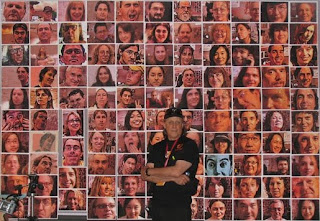
Michael Wright has been running his Portrait Virus project for several years now at various Siggraph shows. All of the portrait virus images are created using Studio Artist. The snapshot above shows Michael standing in front of a collection of portrait virus images generated during a previous Siggraph show in the old Guerilla Studio. (There's also a portrait of me buried in there if you look closely). Examples of the Portrait Virus from Siggraph Studio 2010 are available online here.

Michal runs Studio Artist on a portable computer in the Siggraph studio. He uses Studio Artist's video source capture option to grab a video still of someone in the gallery, and then uses Studio Artist's paint synthesizer in real time with a Wacom tablet to generate a painted digital portrait of that person. Michael also has a daily portrait virus post page available here that shows a new Studio Artist generated self-portrait every day. I'm a big believer in this kind of 'daily art post' project because i think the discipline of generating a new art image and posting it every day helps stimulate creativity in many different ways.

I thought it would be fun to try generating my own portrait virus mutation project. All of the source imagery in this initial portrait virus mutation project is generated from collections of Michael's portrait virus imagery. Part of the point of the mutation project is that all of the mutated images are derived from multiple input images. As opposed to processing a single input image. There are a number of different approaches one can use to work with collections of images with the goal of generating single output images from multiple input images. Photo mosaic imagery is one example of this kind of approach. Another approach is what i call 'stack filtering'. 'Stack' refers to a stack of images.

Studio Artist 4 has a number of different temporal image processing operations. Temporal image operations are image processing effects that work off of multiple frame input images at different times to generate a single output image. They are really designed for video processing. But there's no reason why you can't take any stack of images and run them through a temporal processing effect. So stack filtering is referring to taking a stack of images and processing them with a temporal video processing effect.

I'll be posting different portrait virus mutations on this blog, one a day, until the project runs it's course. The initial posts are going to focus on the use of Studio Artist temporal image operations to process stacks of Michael's original portrait virus images, so again a collection of multiple images are processed to generate a single processed or mutated output image. Hopefully this project will give you some ideas for using stack filtering in your own artistic endeavors. The creative possibilities are really endless.

A big thank you to Michael for being kind enough to allow me to mutate his original portrait virus imagery and infect it with a new digital virus. Michael is a long time pioneer in digital art, and you can learn more about his body of work here.